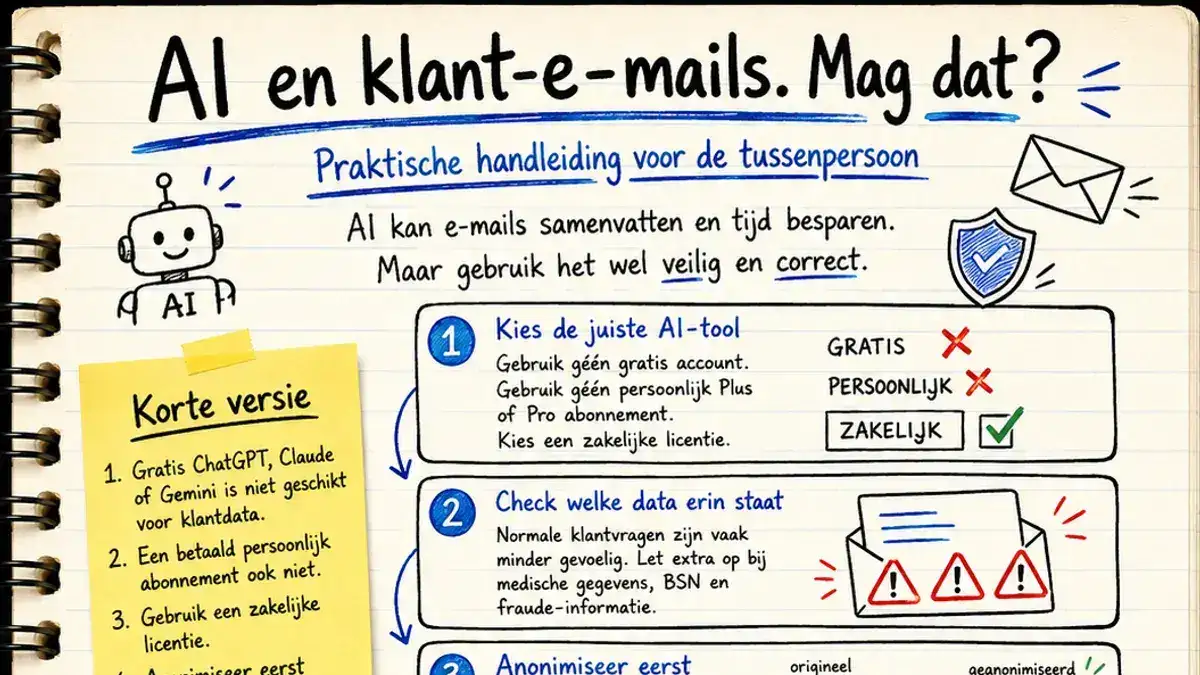
Why this guide?
You are busy. Your inbox is overflowing with customer questions. AI tools like ChatGPT, Claude and Microsoft Copilot can save you hours of work by summarising emails. So it makes sense to wonder: can I just do that?
The answer is nuanced. You certainly may, but not just like that. This guide explains in plain language what is and isn't allowed, what you need to arrange, and how to approach this safely and correctly.
No case law, no legal jargon. Just concrete answers.
TL;DR
- Free ChatGPT, Claude or Gemini is not suitable for customer data. Full stop.
- A paid personal subscription (Plus, Pro) isn't either. You need a business licence.
- With a business licence it is usually allowed, provided you have arranged a number of things.
- Anonymise your email first (remove name, address, policy number). Then you can use it in virtually any AI tool and you've removed most of the worry in one go.
- Some data is always extra sensitive: medical data, citizen service numbers, fraud information. You have to be extra careful with those.
Why you really should pause and think about this
Before I give you the step-by-step plan, first this. Most people have the right instinct. It feels a little uncomfortable to paste a customer's email into an AI tool. But they can't quite explain why it feels uncomfortable. And if you don't know why something is risky, you also can't properly judge when it's acceptable and when it isn't.
So let's cover the basics.
What really happens to your data?
When you type something into ChatGPT, Claude or Copilot, that text doesn't stay on your laptop. It goes to a server. Usually in the United States. Your laptop is really just a pass-through: a device that connects as quickly as possible to a data centre somewhere else, where the real computing power sits. That data centre isn't in your office. It's somewhere far away and it runs day and night.
What then happens to your data depends on three things.
Do you pay or not? With the free version of ChatGPT, the provider may use your data to train its AI models. With the paid versions this usually doesn't happen, although with some tools you have to switch it off yourself. It's then an opt-out, not a default setting. With business versions, training on your data is excluded. But that only applies if you genuinely have a business licence.
Is it stored? Even if it isn't used for training, your input is often retained. Not always encrypted. That means the data is still there in the event of a data breach, a legal request to the company, or if the company changes its policy. What you type in today may still be sitting somewhere a year from now.
Who can access it? Over time your AI account collects months of conversations. Many tools now also have a memory that remembers what you asked earlier. That's convenient, but it also means a single account contains a surprisingly complete picture of you and your work. There's a reason AI companies keep rolling out ever heavier security for personal accounts. They know themselves how valuable that data has become.
Why this matters extra for you as an intermediary
You don't work with your own holiday photos. You work with the data of people who trust you with their insurance, their claim, their financial situation. Sometimes their health. Those people gave you that information for one purpose: to help them. Not to end up in an American data centre.
And the problem is getting bigger, not smaller. More data about people is being collected than ever. On top of that, AI makes it much easier to combine and analyse all those scattered pieces of data. And the number of data breaches involving AI systems keeps rising. So the instinct that it feels risky is correct. Not because your neighbour is reading along, but because the sum of all that data is becoming ever more powerful and ever more vulnerable.
What can go wrong, very concretely
Let's leave the abstraction behind. These are the consequences if you don't arrange this properly.
A data breach. You paste a claim notification with a name, address and policy number into a free AI tool. That company suffers a data breach. Your customer's data is out in the open. You are responsible, because you put that data there.
A fine from the regulator. The Dutch Data Protection Authority can impose fines of up to 20 million euros or 4% of your annual turnover. For a small office that's enough to close the doors. And lower fines hurt too.
Reputational damage. Your entire business runs on trust. A customer who hears that their medical data ended up in an AI tool without their knowledge won't come back. And they'll tell others.
Liability. If something goes wrong with a customer's data, that customer can hold you liable. An insurer or trade association can also start asking questions about how you handle data.
A problem you don't see coming. The most unpleasant scenario: things go well for months, nobody notices anything, and then it surfaces after all. During an audit, a complaint, or a data breach at the provider. At that moment, "I didn't know it wasn't allowed" is no longer a valid excuse.
The reassurance
This sounds like a lot of misery, and it's important you take it seriously. But it's no reason to avoid AI altogether. It's a reason to set it up properly once.
Because here's the good news: if you have the basics in order — a business tool, the right agreements, a working instruction for your staff — then virtually all of these risks disappear. Then you benefit from all the advantages of AI without lying awake at night. It costs you half a day to set up. After that it just works.
The rest of this guide shows you exactly how.
Part 1: The basics. What does the law actually say?
It's not about the AI Act
Many people think the AI Act determines whether you may put customer data into an AI tool. That's not correct. The AI Act is mainly about who may build and sell AI, and about mandatory AI literacy for your staff.
What you need to look at is the GDPR (opens in new window) (General Data Protection Regulation), which has applied since 2018. It governs what you may do with customers' personal data.
In addition, since February 2025 there is one AI Act obligation that also applies to you: your staff must have basic knowledge of AI. I'll come back to that later.
What counts as personal data in an email?
Almost everything. An email from a customer almost always contains:
- Name and email address
- Possibly a phone number and address
- Policy number or customer number
- Information about the situation (claim, request, question)
And also:
- Medical information (in cases of disability, death, care)
- Financial information (income, debts)
- Citizen service number (BSN)
- Information about third parties (family members, witnesses)
The more sensitive the data, the stricter the rules.
The three core rules of the GDPR
For you as an intermediary, three rules matter most:
1. Purpose limitation. You may only use data for the purpose for which you received it. A customer sends you a claim notification so you can help them with their claim. Not so you can throw that data into some random AI tool for other purposes.
2. Data minimisation. Don't use more data than necessary. If only the gist of the email is needed for your summary, you don't need to send along all the attachments.
3. Security. You must ensure the data stays safe. That means: no AI tools that use your data to train their model, and no tools without agreements about what they do with your data.
Part 2: The difference between free, paid and business
This is where most people go wrong. A paid subscription is not the same as a business subscription.
Free versions (ChatGPT free, Claude free, Gemini free)
May you put customer data into these? No.
Why not:
- No data processing agreement with the provider
- Your input may be used to train the AI model
- No guarantees about where your data is stored
- No audit options
Personal paid versions (ChatGPT Plus, Claude Pro, Copilot Pro)
May you put customer data into these? No, not these either.
This is a common misunderstanding. You do pay for it, but it remains a consumer subscription. There's no data processing agreement included and the legal protection for business use is missing.
Business versions (ChatGPT Enterprise/Team, Claude Enterprise/Team, Microsoft 365 Copilot)
May you put customer data into these? Yes, provided you have arranged a number of things.
What's different about them:
- Data processing agreement (DPA) included as standard
- Your data is not used for training
- Audit logs available
- Option for EU data processing
- Central management by your IT or compliance officer
Which business version should you choose?
For most small intermediaries, Microsoft 365 Copilot is the obvious choice, for a very practical reason: you probably already use Microsoft 365 for your email and Office suite. Copilot then works within your existing Microsoft environment. One provider, one contract, one compliance boundary.
ChatGPT Enterprise and Claude Enterprise are also fine options, but those are separate contracts you have to arrange independently.
| Tool | Suitable for customer data? | EU data? | Best for |
|---|---|---|---|
| ChatGPT free / Plus | No | No | Personal use |
| Claude free / Pro | No | No | Personal use |
| Copilot Pro (consumer) | No | No | Personal use |
| Microsoft 365 Copilot (business) | Yes, if arranged | Yes, configurable | Offices with M365 |
| ChatGPT Enterprise | Yes, if arranged | Yes | Non-M365 offices |
| Claude Enterprise | Yes, if arranged | Limited | Specific use cases |
Part 3: When is it allowed and when isn't it?
Suppose you have a business licence. May you then summarise every customer email? Almost, but not quite.
When it's allowed (green light)
You may have a customer email summarised by AI if:
- The summary helps to serve the customer (faster reply, better referral)
- The purpose matches why the customer sent you the email
- There's no extra sensitive data in it (see below)
- You do it within your secure business environment
Examples where it's perfectly fine:
- A customer asks a question about their car insurance. You have Copilot summarise the gist so you can reply faster.
- Summarising a long email with a claim notification for the claims handler.
- Structuring a complaint for internal handling.
- Turning a lengthy email from a prospect into a short note in your CRM.
Follow me on LinkedIn
When it's not allowed (red light)
Stop immediately if the email contains:
Medical data. Think of information about illness, treatment, disability. These are special categories of personal data under the GDPR (Art. 9). Much stricter rules apply here, and an ordinary AI summary is not permitted without explicit consent or a legal basis.
Citizen service number (BSN). The BSN may only be processed if the law explicitly permits it. For most intermediaries the rule is: don't have it processed by AI, not even summarised.
Criminal information. Fraud reports, suspicions of fraud, information from the incident register or the external referral register. Criminal data (GDPR Art. 10) is protected extra strictly.
Information about children. Extra safeguards apply to data concerning minors.
Confidential information about third parties. For example, an email in which your customer writes extensively about an ex-partner or business partner who has no relationship with you.
When in doubt: amber light
In doubt? There are two ways to proceed:
Option A: Anonymise the email first.
Before you send anything to AI, remove or replace:
- Name → replace with [CUSTOMER]
- Email address → [EMAIL]
- Address → [ADDRESS]
- Policy number → [POLICY]
- Phone number → [PHONE]
- Date of birth → [DOB]
- Other names → [NAME 1], [NAME 2]
What remains is the content and context. There's (usually) no personal data left in that. Then you can use it in virtually any AI tool without worry.
Option B: Ask your compliance officer or trade association.
Trade associations often have guidance ready for AI use. A quick phone call is faster than recovering from a data breach.
Part 4: The step-by-step plan for your office
This is what you, as an office, need to arrange before your staff may use AI for customer data. Work through the steps one by one.
Step 1: Choose one AI tool for your office
Not three different tools for different staff members. One choice. For most offices that's Microsoft 365 Copilot because it works alongside your existing email.
Step 2: Take out a business licence
Make sure you have a genuine business tier, not a consumer version. Keep the contract and the accompanying data processing agreement (DPA) in your records.
Step 3: Switch on EU data processing
With Microsoft Copilot you can choose the EU Data Boundary in the admin settings. Ask your IT provider or administrator to activate this. It isn't always on by default.
Step 4: Update your record of processing activities
Your record of processing activities (GDPR Art. 30) must state that you use AI to process customer communication. You describe:
- Which tool you use (for example Microsoft 365 Copilot)
- What the purpose is (summarising and structuring customer communication)
- Which legal basis you use (usually: performance of a contract or legitimate interest)
- Which data is processed with it
- How long you retain it
Step 5: Carry out a DPIA
A DPIA (Data Protection Impact Assessment) is a mandatory risk analysis for data processing.
You don't have to write this yourself. Ask your accountant, IT provider or an external privacy adviser. Cost: usually between €500 and €2,000 one-off. One DPIA suffices for all AI use of customer data.
Step 6: Update your privacy statement
Your customers need to know that you use AI. Add a passage to your privacy statement:
"In handling your questions and files, we use AI tools to summarise and structure communication. These tools process your data within our secure business environment and do not use your data to train their AI models."
Not complicated. But required.
Step 7: Create an internal working instruction
One page. What's allowed, what isn't. See the example at the bottom of this guide.
Step 8: Train your staff
This is the AI Act obligation (Article 4) (opens in new window): since February 2025, staff who use AI must have basic knowledge of AI.
What your employee needs at a minimum:
- What AI is, what it can and cannot do
- What risks are involved
- Which tools they may use at our office
- Which data may and may not go into AI
A 45-minute session with a short test is enough. Keep proof of participation.
Step 9: Set up logging and retention periods
Make sure you can trace who did what with AI. Microsoft Copilot has built-in logging for this (Microsoft Purview). With other tools you have to arrange this separately.
Step 10: Schedule an annual review
AI changes fast. What's allowed today may be different tomorrow. Schedule a short review every year: are we still using the right tool, are our policies still correct, have there been any incidents?
Part 5: The practical workflow for your staff
Once everything is arranged at the office, the daily workflow looks like this:
Before you click "summarise"
- Read the email briefly. What's in it?
- Check the sensitivity. Does it contain medical, financial, criminal or BSN information? If so → don't summarise, or anonymise first.
- Check the purpose. Does the summary match why the customer sent you the email? If not → don't do it.
- Use the right tool. Only the business AI tool the office has approved, no personal accounts.
While summarising
- Use the AI within your secure environment. With Copilot you do that in Outlook or Teams itself. Don't copy and paste into copilot.microsoft.com — that takes you outside your tenant.
- Ask only for what's needed. "Give a summary in three sentences" is better than "do something with this email".
After summarising
- Check the output. AI can hallucinate. Does the summary really match what's in the email?
- Store the summary under the same rules as the original email. Usually: in your CRM or file, with the same retention period.
- Don't be secretive. If a customer asks about it, be honest: "Yes, we use AI to process your communication faster, which is also stated in our privacy statement."
Part 6: Frequently asked questions
May I summarise a car insurance claim notification?
Yes, if it happens within your business AI tool and you've arranged everything (see the step-by-step plan). Claims handling is a normal purpose within your contract with the customer.
And a claim notification in which the customer was injured?
Here it gets trickier. Injury is medical information. Two options: anonymise the medical details first, or handle that email manually.
May I have an AI summarise a credit register extract?
Better not. Credit register data is highly sensitive financial personal data. Do these manually or work with anonymised versions.
A prospect sends me a long quote request. May I summarise it?
Yes. This falls under normal acquisition. Condition: in a business AI tool, not a free version.
May I have AI generate a note or customer record?
Yes, that falls under performance of your contract. Provided it's a business tool.
A customer sends me an email with information about their ex-partner who is not a customer of mine. May I summarise it?
Carefully. The ex is not your customer, you have no basis to process their data. Anonymise the information about that person, or summarise only the part that concerns your own customer.
May I use AI to write a reply to a customer?
Yes, that's allowed under the same conditions as summarising. But always read it over yourself before sending. You remain responsible for what goes out.
What if a data breach arises because I used AI incorrectly?
Handle it like any other data breach: report it to the Dutch Data Protection Authority within 72 hours and, depending on the severity, also to the customer involved. And learn from it: update your working instruction.
Do I have to ask my customers for consent in advance?
Usually not. For normal customer handling you don't need separate consent, provided you mention it neatly in your privacy statement. You do need consent for special categories of personal data (medical, etc.) or if you deploy AI for purposes outside the direct service (such as profiling for marketing).
May I use free ChatGPT for my own learning, separate from customer data?
Yes, that's fine. As long as there's no customer data in it, you may use any AI tool for general questions, brainstorming or learning.
Part 7: Example internal working instruction
Below is an example you can adapt to your own office.
Working instruction: AI use in customer communication
Purpose: Safe and correct use of AI when handling customer communication.
For whom: All staff who handle customer communication.
Which tool do we use: [for example: Microsoft 365 Copilot]
Which tools may NOT be used for customer data: Free ChatGPT, free Claude, free Gemini, personal paid accounts.
What you may do with customer data in our AI tool:
- Summarise emails for a faster overview
- Structure long documents
- Draft reply concepts (always check yourself before sending)
- Categorise or refer customer questions
What you may NOT do, even with our tool:
- Summarise emails with medical information without anonymising
- Process emails with a BSN
- Process fraud information or external referral register data
- Process data of people who are not our customers without a legal basis
When in doubt: First check with [name of compliance officer]. Better to ask once too often.
In case of a mistake: Report immediately to [name], no shame. Better early than late.
In closing
AI tools are a tremendous help in your daily work as an intermediary. You don't have to avoid them out of fear of the GDPR. But you also can't just use them the way you'd pick up a calculator.
It comes down to three principles:
- Use the right tool (business, not personal)
- Arrange the basics at office level (DPA, DPIA, privacy statement, working instruction, training)
- Be careful with sensitive data (medical, BSN, fraud — handle manually or anonymise)
Do this well, and you benefit from AI without legal hassle. Don't, and you risk fines (the GDPR provides for fines of up to 4% of annual turnover) and reputational damage.
Invest half a day to set this up properly. It pays for itself.
This guide provides general information and is not legal advice. When in doubt, consult your trade association, a privacy lawyer or the Dutch Data Protection Authority.