Wat is WebMCP en waarom nu?
WebMCP (Web Model Context Protocol) is een browser-API waarmee je als websitebouwer functies van je webapplicatie beschikbaar maakt voor AI-agents. Zo'n functie heet een tool. Elke tool krijgt een naam, een beschrijving in gewone taal en een schema dat vastlegt welke invoer hij verwacht. De specificatie omschrijft het doel kort: webapplicaties JavaScript-tools laten aanbieden aan AI-agents.
Een voorbeeld maakt het tastbaar. Stel, je hebt een webshop met een zoekfilter op maat, kleur en prijs. Een agent die dat filter zonder WebMCP moet bedienen, maakt een screenshot, zoekt de juiste dropdown, klikt, wacht, maakt weer een screenshot. Met WebMCP registreer je één tool, `filter_producten`, met drie velden. De agent vult die in en jouw eigen code doet de rest. Het filter op je pagina springt mee, dus de gebruiker ziet wat er gebeurt.
De standaard komt uit de Web Machine Learning Community Group van de W3C. De eerste auteurs werkten bij Microsoft en Google. De actuele versie van de spec is een Draft Community Group Report van 9 september 2026, met Brandon Walderman (Microsoft), Khushal Sagar en Dominic Farolino (Google) als editors.
Waarom het nu speelt
Vijf momenten laten zien hoe snel dit ging:
| Datum | Wat er gebeurde | Bron |
|---|---|---|
| 13 augustus 2025 | Eerste publicatie van het WebMCP-voorstel | GitHub-explainer |
| 10 februari 2026 | Chrome opent het WebMCP Early Preview Program | Chrome for Developers |
| 19 mei 2026 | Google I/O: origin trial vanaf Chrome 149, Gemini in Chrome volgt "binnenkort" | Chrome for Developers |
| 9 juni 2026 | Aankondiging van de origin trial voor ontwikkelaars | Chrome for Developers |
| 9 september 2026 | Laatste versie van het spec-concept | WebMCP-spec |
Bij de I/O-aankondiging toonde Google logo's van merken die met WebMCP experimenteren, waaronder Expedia, Booking.com, Shopify, Etsy, Target, Credit Karma en TurboTax (bron). Dat zijn reis-, retail- en financiële partijen: sectoren waar een klant een formulier invult om iets te boeken, te kopen of aan te vragen.
Ook de zoekinteresse laat de piek zien. Volgens Ahrefs zochten Nederlanders in januari 2026 zo'n 8 keer op "webmcp". In februari, de maand van de early preview, waren dat er 1.077.
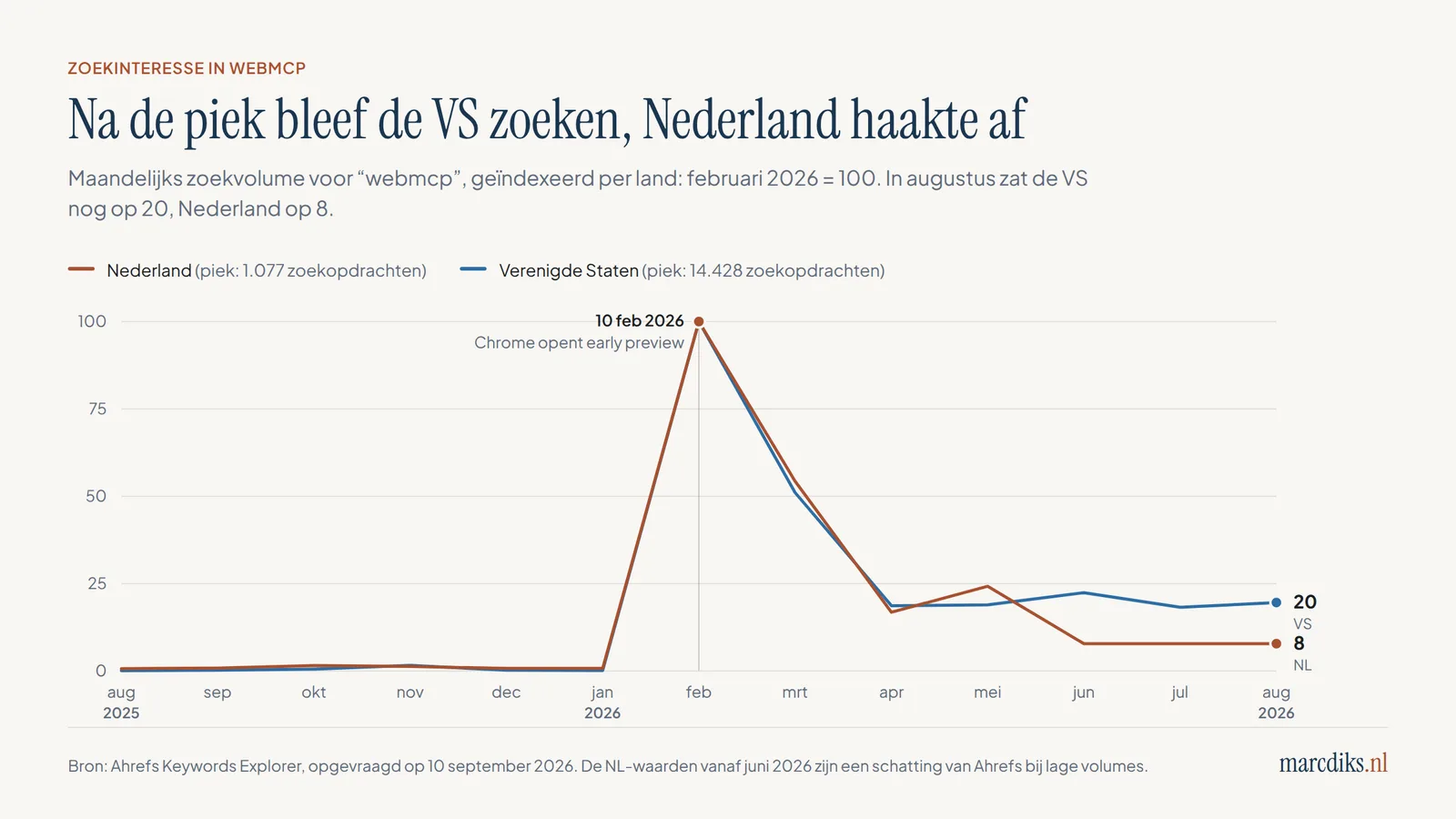
| Maand | Zoekvolume "webmcp" NL | Zoekvolume "webmcp" VS |
|---|---|---|
| nov 2025 | 14 | 231 |
| dec 2025 | 8 | 29 |
| jan 2026 | 8 | 21 |
| feb 2026 | 1.077 | 14.428 |
| mrt 2026 | 585 | 7.366 |
| apr 2026 | 181 | 2.694 |
| mei 2026 | 261 | 2.728 |
| jun 2026 | 84 | 3.229 |
| jul 2026 | 84 | 2.628 |
| aug 2026 | 84 | 2.825 |
Bron: Ahrefs Keywords Explorer, opgevraagd op 10 september 2026. De gelijke NL-waarden vanaf juni zijn een schatting van Ahrefs bij lage volumes.
Wat ik hier zie: de Amerikaanse curve zakt na de piek naar een stabiele bodem van rond de 2.700 zoekopdrachten per maand. Nederland zakt veel verder. Mijn lezing is dat developers in de VS ermee aan de slag zijn gegaan, terwijl het in Nederland bij nieuwsgierigheid bleef. Voor een bestuurder betekent dat vooral tijd. Je kunt nu rustig uitzoeken welke acties je aan agents wilt toevertrouwen, voordat een concurrent of een platform die keuze voor je maakt.
WebMCP hoort bij een bredere beweging die vaak het agentic web heet: een web waarop AI-agents namens mensen zoeken, vergelijken en handelen. Hoe dat de winkelstraat verandert, lees je in agentic commerce: hoe AI-agents online retail op z'n kop zetten. Of je straks nog een eigen website nodig hebt, lees je in hebben we anno 2026 nog websites nodig?.
Wat is MCP (Model Context Protocol)?
MCP is een open standaard om AI-applicaties te verbinden met externe systemen. De officiële documentatie gebruikt een vergelijking die blijft hangen: zie MCP als een USB-C-poort voor AI-applicaties. Met één soort aansluiting koppel je veel verschillende apparaten.
Anthropic introduceerde MCP op 25 november 2024. Een jaar later, op 9 december 2025, bracht Anthropic het protocol onder bij de Agentic AI Foundation, een fonds binnen de Linux Foundation dat het samen met Block en OpenAI oprichtte. Google, Microsoft, AWS, Cloudflare en Bloomberg steunen die foundation. De bestaande maintainers houden de technische regie.
Hoe MCP werkt
MCP kent drie rollen (architectuuroverzicht):
- De host is de AI-applicatie waarin je werkt, zoals Claude, ChatGPT of een code-editor.
- De client is het onderdeel in die host dat één verbinding onderhoudt met één server.
- De server is het programma dat context en acties levert, bijvoorbeeld een koppeling met je CRM, je bestanden of een boekingssysteem.
Een MCP-server biedt drie soorten bouwstenen aan. Tools zijn functies die de AI kan uitvoeren, zoals een databasevraag of een API-aanroep. Resources zijn gegevens die als context dienen, zoals de inhoud van een bestand. Prompts zijn herbruikbare sjablonen voor een gesprek met het model. Een server kan lokaal draaien op je laptop of op afstand via HTTP, en dan bedient hij veel gebruikers tegelijk.
Het protocol ontwikkelt snel. De specificatie van 28 juli 2026 maakte de kern van MCP stateless: elk verzoek beschrijft zichzelf, wat het makkelijker maakt om servers achter gewone infrastructuur te draaien. In dezelfde release werd de autorisatie aangescherpt. Volgens de maintainers halen de belangrijkste SDK's samen bijna een half miljard downloads per maand.
Sinds 26 januari 2026 bestaat er ook MCP Apps, een uitbreiding die Anthropic en OpenAI samen met de MCP-UI-community ontwikkelden. Daarmee kan een tool een interactief scherm teruggeven dat direct in het chatvenster verschijnt, bijvoorbeeld een premievergelijking met knoppen. Houd die drie begrippen uit elkaar: MCP (de verbinding), MCP Apps (een interface in de chat) en WebMCP (tools op je eigen webpagina).
MCP-servers zijn krachtig, en daarom ook een aanvalsoppervlak. Hoe aanvallers kwaadaardige instructies in toolbeschrijvingen verstoppen, lees je in AI-skills zijn het nieuwe phishing.
Wat is het verschil tussen WebMCP en MCP?
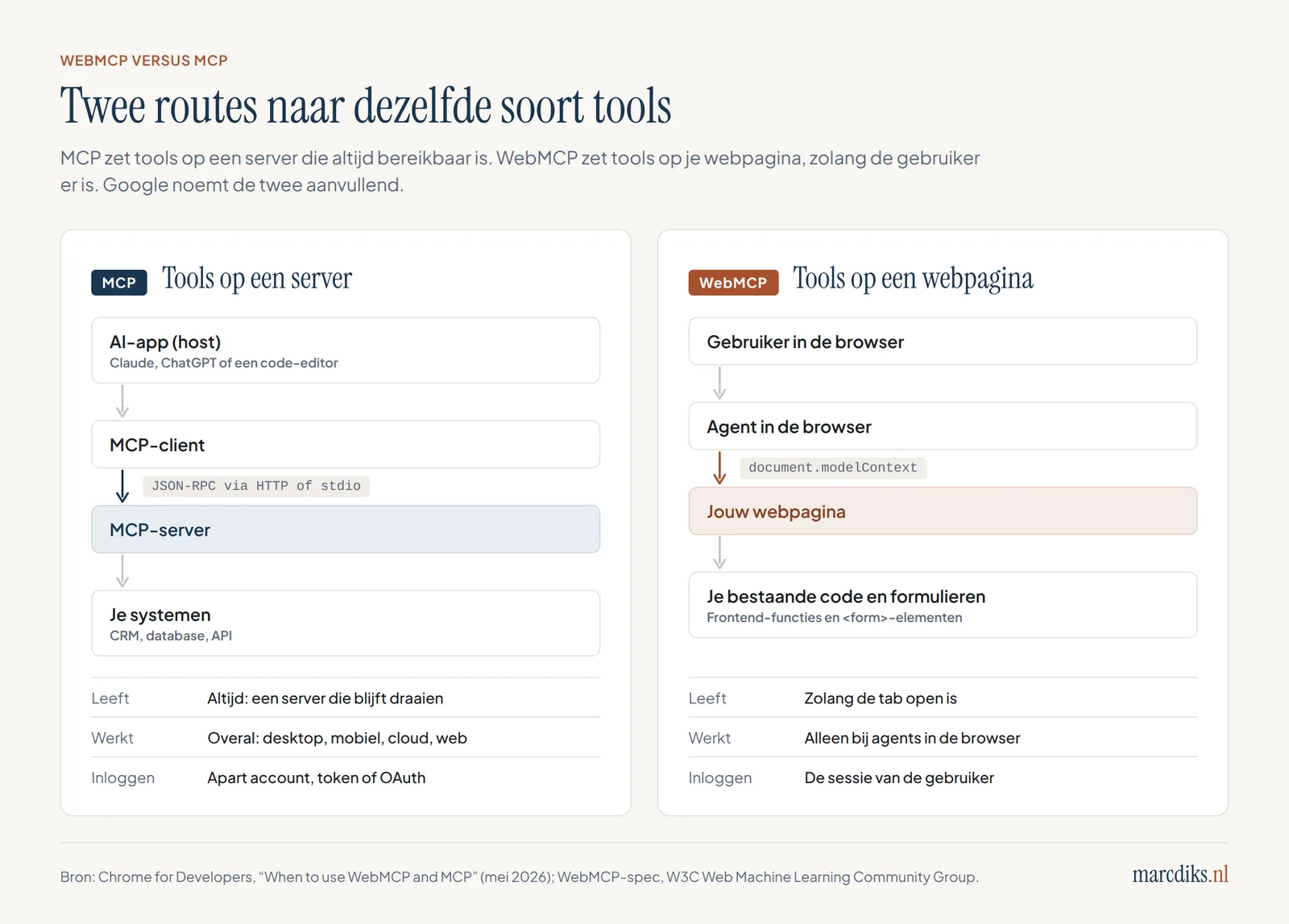
Het korte antwoord: MCP zet tools op een server, WebMCP zet tools op een webpagina. De naam lijkt op elkaar omdat WebMCP de woorden en het denkraam van MCP overneemt: tools, schema's, parameters. Het is wel een aparte standaard. De WebMCP-explainer zegt het zelf: WebMCP haalt zijn inspiratie direct uit MCP, maar is gebouwd als een oplossing die past bij het webplatform en veilig is aan de kant van de gebruiker.
Google publiceerde een eigen vergelijking. Hieronder staat die vergelijking in het Nederlands, aangevuld met drie punten die voor een beslisser tellen: inloggen, wie het bouwt en wie de standaard beheert.
| MCP | WebMCP | |
|---|---|---|
| Doel | Data en acties overal en altijd beschikbaar maken voor agents | Een live website klaarmaken voor directe interactie met een agent, tijdens het bezoek van de gebruiker |
| Levensduur | Blijvend: een server die altijd draait | Tijdelijk: bestaat zolang de tab open is |
| Waar het werkt | Overal: desktop, mobiel, cloud, web | Alleen bij agents in de browser |
| Relatie met de interface | Werkt buiten je interface om (headless) | Werkt in je pagina en ziet wat de gebruiker ziet |
| Hoe een agent de tools vindt | Per agent aanmelden of configureren | De pagina registreert de tools zodra de gebruiker er is |
| Wie is ingelogd | Een apart account, token of OAuth-koppeling | De sessie van de gebruiker in de browser |
| Wie bouwt het | Backend-developers, met SDK's in onder meer TypeScript en Python | Frontend-developers, met JavaScript of HTML-attributen |
| Beheer van de standaard | Agentic AI Foundation (Linux Foundation) | Web Machine Learning Community Group (W3C) |
Het verschil in inloggen is voor veel organisaties het zwaarste punt. Bij een MCP-server moet je regelen wie de agent is en wat hij mag, meestal met OAuth. Bij WebMCP draait de tool in de sessie van iemand die al bij je is ingelogd. De spec gaat er daarom van uit dat agents de identiteit en inlogstatus van de gebruiker overnemen uit de browser. Dat scheelt een integratieproject, en het legt de verantwoordelijkheid voor wat er gebeurt dichter bij de gebruiker.
Wanneer kies je wat?
Google raadt aan om beide te gebruiken, elk voor zijn eigen taak. MCP draagt de kernlogica: data ophalen, achtergrondtaken, acties die ook moeten werken als niemand op je site is. WebMCP geeft een agent in de browser grip op je interface op het moment dat een klant langskomt.
Een reisorganisatie maakt het verschil helder. Via een MCP-server kan een assistent in ChatGPT of Claude beschikbaarheid opvragen, ook als de reiziger nooit op de site is geweest. Via WebMCP kan een agent in Chrome op de boekingspagina de stoelkeuze invullen, terwijl de reiziger ingelogd is en meekijkt. Het eerste gaat over bereik buiten je site. Het tweede gaat over gemak op je site.
Wie die afweging groter wil maken, zit al snel bij de vraag waar je agents draaien en hoe afhankelijk je bent van één leverancier. Die vraag staat centraal in AI vendor lock-in: waarom de kill switch jouw probleem is.
Hoe werkt WebMCP technisch?
WebMCP geeft je twee manieren om tools te maken. De imperatieve API is JavaScript en geeft je volledige controle. De declaratieve API bestaat uit een paar extra HTML-attributen op een formulier dat je al hebt. Beide staan beschreven in de Chrome-documentatie.
De imperatieve API: een tool registreren in JavaScript
Je registreert een tool via `document.modelContext.registerTool()`. Let op als je oudere tutorials leest: in eerdere versies heette de ingang `navigator.modelContext`. De huidige spec en de Chrome-documentatie gebruiken `document.modelContext`.
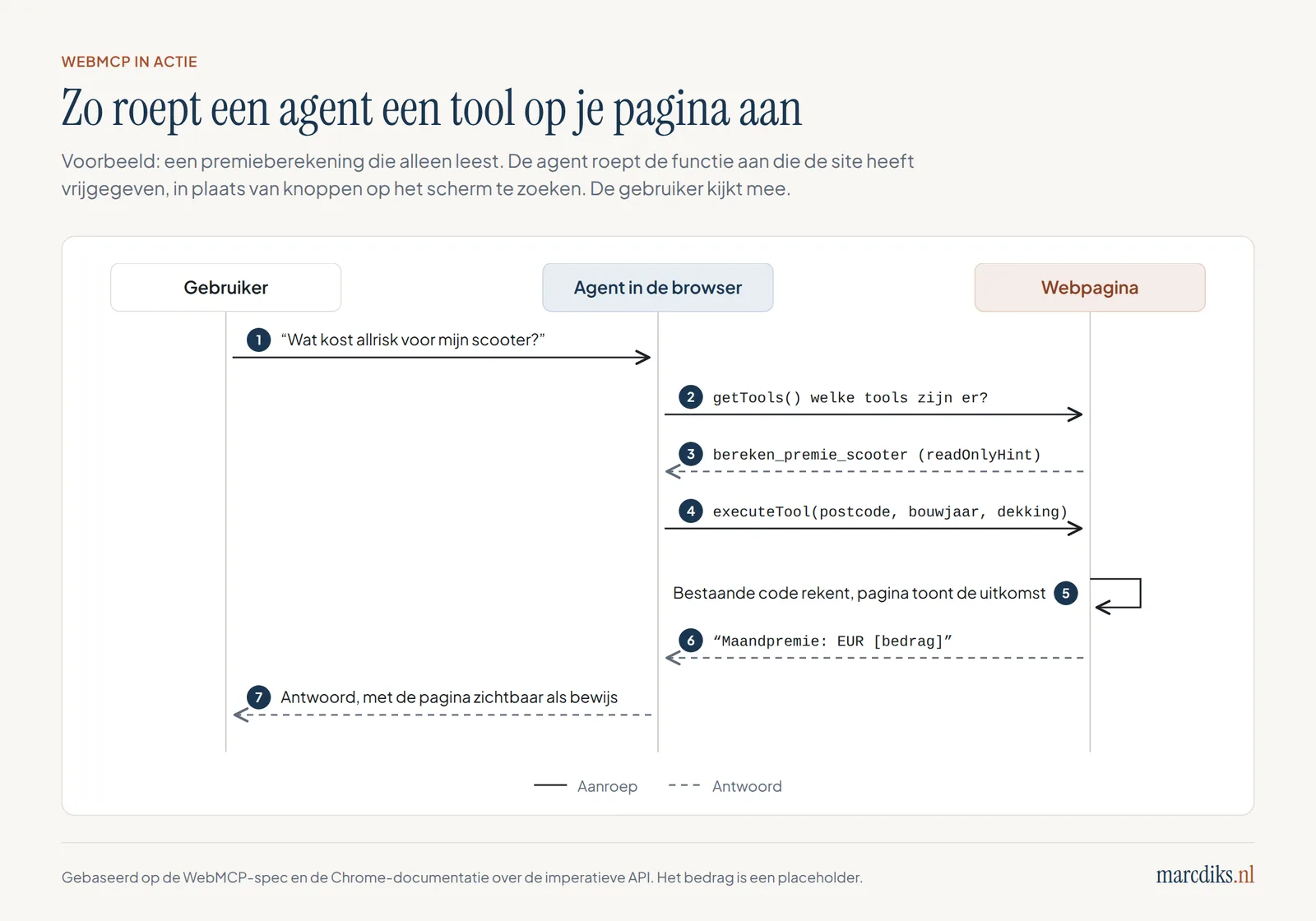
Een tool bestaat uit een naam, een beschrijving, een invoerschema in JSON Schema en een `execute`-functie die het werk doet. Hieronder een voorbeeld voor een premiecalculator. De vorm volgt de Chrome-documentatie; de calculatorfunctie zelf is je eigen bestaande code.
await document.modelContext.registerTool({
  name: 'bereken_premie_scooter',
  title: 'Premie scooterverzekering berekenen',
  description:
    'Berekent de maandpremie voor een scooterverzekering op basis van ' +
    'postcode, bouwjaar en dekking. Sluit niets af.',
  inputSchema: {
    type: 'object',
    properties: {
      postcode: { type: 'string', description: 'Nederlandse postcode, bijv. 3401AB' },
      bouwjaar: { type: 'integer', minimum: 1990 },
      dekking: { type: 'string', enum: ['wa', 'wa_beperkt_casco', 'allrisk'] },
    },
    required: ['postcode', 'bouwjaar', 'dekking'],
  },
  annotations: { readOnlyHint: true },
  execute: async ({ postcode, bouwjaar, dekking }) => {
    const premie = await berekenPremie(postcode, bouwjaar, dekking); // je bestaande code
    toonUitkomstOpPagina(premie); // de gebruiker ziet hetzelfde resultaat
    return `Maandpremie: EUR ${premie.toFixed(2)}`;
  },
});
Een tool weer afmelden gaat met een `AbortSignal`: je geeft `{ signal: controller.signal }` mee bij het registreren en roept later `controller.abort()` aan. Zo bied je een tool alleen aan op het moment dat hij zinvol is, bijvoorbeeld pas na het inloggen.
Annotaties: vertel de agent hoe gevaarlijk een tool is
De spec kent drie annotaties die een agent helpen inschatten hoe voorzichtig hij moet zijn:
| Annotatie | Betekenis | Voorbeeld |
|---|---|---|
| `readOnlyHint` | De tool leest alleen en verandert niets | Premie berekenen, orderstatus opvragen |
| `consequentialHint` | De tool heeft gevolgen die groot, echt of onomkeerbaar zijn | Betalen, een polis opzeggen, een boeking annuleren |
| `untrustedContentHint` | De uitkomst bevat inhoud die de agent niet blind moet vertrouwen | Reviews of berichten van andere gebruikers |
Alle drie staan standaard op `false` (spec, ToolAnnotations). Het zijn hints: jij vertelt de agent wat de tool doet, de agent beslist hoe hij ermee omgaat. Een agent die `consequentialHint` ziet, hoort de gebruiker om bevestiging te vragen. Afdwingen kan de spec dat niet.
De declaratieve API: een formulier dat je al hebt
Heb je al een net HTML-formulier, dan kun je daar met een paar attributen een tool van maken. Dit voorbeeld komt uit de Chrome-documentatie, vertaald naar een schademelding:
<form toolname="schade_melden"
      tooldescription="Meldt schade aan een bestaande polis. De klant verstuurt zelf."
      action="/schade/melden">
<label for="polisnummer">Polisnummer</label>   <input type="text" id="polisnummer" name="polisnummer" required>
<select name="soort" required           toolparamdescription="Soort schade: bepaalt naar welk team de melding gaat.">     <option value="aanrijding">Aanrijding</option>     <option value="diefstal">Diefstal</option>     <option value="brand">Brand</option>   </select>
<button type="submit">Melding versturen</button> </form>
Met `toolname` en `tooldescription` benoem je de tool. Met `toolparamdescription` leg je per veld uit wat erin hoort. De agent vult de velden in, maar de gebruiker drukt zelf op versturen. Pas als je `toolautosubmit` toevoegt, mag de agent het formulier ook zelf versturen.
Voor developers zijn er nog een paar handvatten. Bij een verzending door een agent staat `SubmitEvent.agentInvoked` op `true`, en met `respondWith()` stuur je een resultaat of foutmelding terug naar het model. Chrome vuurt een `toolactivated`-event af zodra de velden zijn ingevuld en een `toolcancel`-event als de gebruiker afbreekt. Met de CSS-pseudoklassen `:tool-form-active` en `:tool-submit-active` kun je zichtbaar maken dat een agent met het formulier bezig is.
Wat er gebeurt als een agent een tool aanroept
Veiligheid zit in de browser
WebMCP werkt alleen in een beveiligde context (HTTPS) en in documenten die van elkaar gescheiden zijn per herkomst. Het gebruik valt onder de Permissions Policy `tools`, die standaard op `self` staat. Een iframe van een ander domein mag alleen tools aanbieden als je hem expliciet `allow="tools"` geeft (Chrome-documentatie). Met de optie `exposedTo` uit de spec maak je een tool alleen zichtbaar voor bepaalde herkomsten.
Waarom tools beter werken dan een agent die je scherm leest
Agents kunnen websites al langer bedienen zonder WebMCP. Ze maken screenshots, lezen de HTML-structuur en simuleren klikken en toetsaanslagen. Dat werkt, maar het is traag en breekbaar. Verschuift er een knop, dan klikt de agent ernaast. Heeft een datumkiezer een eigen widget, dan raakt de agent de weg kwijt.
De Chrome-aankondiging van de origin trial vat het verschil kort samen. Een agent hoeft niet meer te raden waar een knop of veld voor dient, want de site verklaart zelf wat het doel is (bron). Dat heeft drie gevolgen die je als organisatie merkt.
Het gaat sneller en met minder fouten. Een tool met een schema zegt precies welke invoer geldig is. Een veld met een lijst van drie dekkingen laat geen ruimte voor een verzonnen vierde.
Je houdt ook de regie over je eigen interface. Een van de doelen in de explainer is het voorkomen dat webinhoud wordt weggedrukt door tussenpartijen. Zolang de actie op jouw pagina gebeurt, blijft de klant bij jou, zie je je eigen voorwaarden en disclaimers, en draait je eigen validatie. Hoe hard platforms die positie willen innemen, lees je in waarom OpenAI nu jouw concurrent wordt.
En de mens blijft in beeld. De explainer noemt uitdrukkelijk als niet-doel: volledig autonome workflows zonder menselijk toezicht, en het vervangen van de menselijke interface. De gebruiker ziet de pagina bewegen terwijl de agent werkt.
Er zit ook een toegankelijkheidskant aan. De explainer noemt "toegankelijkheid verbeteren via agents" als doel. Een formulier dat goed gelabeld is voor een schermlezer, is meestal ook makkelijk om te zetten naar een declaratieve WebMCP-tool. Wie al werk heeft gemaakt van toegankelijkheid als innovatie, heeft hier een voorsprong.
Wat betekent WebMCP voor je website, SEO en AI-vindbaarheid?
Wie met AI-vindbaarheid bezig is, stelt zich de vraag of AI-systemen je vinden en citeren. WebMCP gaat over de stap daarna: kan een agent iets doen op je site als de gebruiker er eenmaal is? Vindbaar zijn en bruikbaar zijn horen bij elkaar, maar het zijn verschillende klussen. Het eerste staat in de gids AI-vindbaarheid. Wat een AI Overview doet met je verkeer, lees je in wat een AI Overview betekent voor je website.
Is WebMCP een rankingfactor?
Daar is geen bewijs voor. Google heeft niet gezegd dat WebMCP meetelt in de zoekresultaten. Wel heeft Google in Lighthouse, de gratis audit-tool in Chrome, een nieuwe categorie toegevoegd: agentic browsing. Die meet hoe goed je site gebouwd is voor interactie met machines. Hij geeft geen score van 0 tot 100, maar een verhouding van geslaagde checks. Je hebt Chrome 150 of nieuwer nodig.
De categorie bevat deze audits:
| Audit | Wat het controleert |
|---|---|
| Registered WebMCP tools | Welke WebMCP-tools je pagina registreert (informatief) |
| Forms missing declarative WebMCP | Formulieren die nog geen `toolname` en `tooldescription` hebben |
| WebMCP schema validity | Of je toolschema's kloppen |
| llms.txt | Of je site een llms.txt-bestand heeft |
| Accessibility for agents | Of agents je pagina kunnen begrijpen via de toegankelijkheidsboom |
| Layout stability | Of je layout verspringt tijdens het laden (Cumulative Layout Shift) |
Bron: Lighthouse agentic browsing scoring, laatst bijgewerkt 5 mei 2026.
Die lijst zegt iets over hoe Google naar het web kijkt. WebMCP staat naast llms.txt, toegankelijkheid en een stabiele layout in één rijtje. Samen vormen ze een checklist voor een site die machines kunnen lezen en bedienen. Of die checklist ooit meetelt voor je positie in Google, heeft Google niet gezegd. Als nulmeting kun je hem vandaag al gebruiken.
Hoe WebMCP zich verhoudt tot llms.txt en schema.org
Drie technieken worden vaak op één hoop gegooid. Ze doen elk iets anders:
| Techniek | Wat het doet | Voor wie |
|---|---|---|
| Schema.org (JSON-LD) | Beschrijft wat er op een pagina staat: een artikel, product, organisatie | Zoekmachines en AI-systemen die je pagina lezen |
| llms.txt | Geeft taalmodellen een overzicht van je belangrijkste inhoud in markdown | AI-systemen die je site verkennen |
| WebMCP | Biedt acties aan die een agent op je pagina kan uitvoeren | Agents in de browser van een bezoeker |
Schema.org en llms.txt helpen een AI-systeem begrijpen wat je hebt. WebMCP helpt een agent iets gedaan krijgen. Een sterke site heeft uiteindelijk alle drie.
De vraag die je als organisatie moet beantwoorden
Een webwinkel die WebMCP goed inricht, maakt het een agent makkelijk om te zoeken, te filteren en een winkelmand te vullen. Dat klinkt als pure winst. Het verandert wel wie je klant is op het moment van de keuze: steeds vaker is dat een agent die snel een vergelijking maakt. De site met de duidelijkste tools wordt voor die agent de makkelijkste keuze, en dus vaker de winnaar van de vergelijking.
WebMCP in de verzekeringspraktijk
Verzekeren is een schoolvoorbeeld van werk dat via formulieren gaat: premie berekenen, een offerte aanvragen, schade melden, een adreswijziging doorgeven of een polis opzeggen. Het zijn precies de handelingen waar een agent met WebMCP iets mee kan. Het zijn ook handelingen met juridische en financiële gevolgen voor de klant.
Deze indeling helpt om te bepalen wat je wel en niet als tool aanbiedt:
| Handeling | Type tool | Annotatie | Wie drukt op de knop? |
|---|---|---|---|
| Premie berekenen | Imperatief of declaratief | `readOnlyHint: true` | De agent mag dit zelf |
| Dekkingen vergelijken | Imperatief | `readOnlyHint: true` | De agent mag dit zelf |
| Schade melden | Declaratief formulier | geen `toolautosubmit` | De klant verstuurt zelf |
| Adres wijzigen | Declaratief formulier | `consequentialHint: true` | De klant bevestigt |
| Polis afsluiten | Beter nog niet als tool | n.v.t. | De klant, in de gewone flow |
| Herroepen of opzeggen | Declaratief, met bevestiging | `consequentialHint: true` | De klant bevestigt |
Die laatste rij verdient aandacht. Sinds 19 juni 2026 moet een consument een overeenkomst die hij online afsloot, ook voor financiële diensten zoals een verzekering, via een duidelijk zichtbare herroepingsfunctie kunnen herroepen (Richtlijn (EU) 2023/2673). Wat dat voor verzekeraars en adviseurs betekent, lees je in herroepen of opzeggen: de nieuwe herroepingsknop voor verzekeringen en in dark patterns verbod en verplichte opzegknop. Wie een opzegknop voor mensen bouwt, kan diezelfde flow met een paar attributen ook bruikbaar maken voor de agent van een klant. Dan geldt de omgekeerde plicht ook: maak het een agent niet moeilijker om op te zeggen dan om af te sluiten.
Aan de bouwkant merk ik: ik werk zelf aan een MCP-server waarmee je in een AI-chat een premie voor een scooterverzekering berekent. Het protocol was het makkelijke deel. De lastige beslissing was waar de agent stopt. In mijn ontwerp berekent de agent alleen de premie. Daarna krijgt de klant een link naar de bestaande offertepagina op de website en sluit hij daar zelf af. Zo hoefde er geen nieuwe betaalflow te komen, en zet de klant de laatste stap op een pagina die al bestaat en al getest is. Diezelfde afweging komt terug bij WebMCP, alleen dan op je eigen site.
Voor adviseurs en tussenpersonen speelt nog iets. Als een agent op jouw site een formulier invult, blijft jouw zorgplicht richting de klant bestaan. Een agent die een dekking kiest op basis van de laagste premie, weet niet dat de klant een dure e-bike in de schuur heeft staan. Voor advieszware producten ligt de waarde van WebMCP daarom vooral in de voorfase, bij informatie ophalen en gegevens alvast invullen, en minder bij het afsluiten zelf. Dat is een inschatting op basis van hoe advies nu werkt. Hoe je klantgegevens veilig door AI laat verwerken, staat in klantdata uploaden naar AI: wat mag wel en niet.
Welke risico's brengt WebMCP mee?
WebMCP maakt het makkelijker voor agents om iets te doen. Dat geldt voor goede en slechte bedoelingen. De spec is er opvallend open over en noemt vijf risico's:
- Prompt injection. Kwaadaardige instructies in de naam, beschrijving of parameters van een tool die het gedrag van de agent sturen.
- Verkeerd voorgestelde intentie. Een tool die iets anders doet dan de beschrijving belooft, of een agent die de bedoeling van de gebruiker verkeerd leest.
- Privacylekken via te veel parameters. Een tool die meer gegevens vraagt dan nodig is, trekt gevoelige informatie uit de agent.
- Grenzen tussen domeinen. Tools die de scheiding tussen herkomsten omzeilen.
- Privénavigatie. Hoe tools zich gedragen in een incognitovenster, waar de gebruiker verwacht dat er niets blijft hangen.
Om het gewicht te begrijpen, moet je weten wat de spec aanneemt over agents. Die kunnen de identiteit en inlogstatus van de gebruiker overnemen, bij betaalgegevens en browsergeschiedenis, en informatie over meerdere websites combineren. Een agent met die toegang die een gemanipuleerde toolbeschrijving leest, kan veel schade doen.
De spec noemt vier tegenmaatregelen. Beperk de lengte van toolbeschrijvingen en invoer, zodat er minder ruimte is voor verstopte instructies. Werk met gedeelde testsets voor aanvallen, zodat browsers vergelijkbare verdediging bouwen. Markeer onbetrouwbare uitkomsten met `untrustedContentHint`. En markeer tools met gevolgen met `consequentialHint`.
Wat de spec niet voor je regelt
Een paar dingen moet je zelf inrichten:
- Wijzigende tools. Tools kunnen tijdens een bezoek verschijnen en verdwijnen; de spec heeft er zelfs een `toolchange`-event voor. Een aanpassing aan je site kan dus ongemerkt nieuwe acties openzetten voor agents. Leg vast wie een nieuwe tool goedkeurt, net als bij een nieuwe API.
- Logging. De browser houdt niet voor jou bij welke agent welke tool aanriep met welke invoer. Wil je dat kunnen reconstrueren, dan log je dat in je eigen `execute`-functie of formulierafhandeling.
- Validatie aan de serverkant. Een agent kan invoer sturen die je interface normaal tegenhoudt. Vertrouw daarom nooit alleen op het schema: controleer alles opnieuw op je server.
Aan de bestuurstafel stel ik bij dit soort voorstellen eerst één vraag: welke actie mag een agent namens een klant uitvoeren zonder dat die klant nog een keer bevestigt? Het antwoord bepaalt je risicoprofiel meer dan welke techniek je kiest. Voor leesacties is het antwoord ruim. Voor alles met geld, gezondheid of een contract is het in mijn ogen voorlopig: geen enkele.
Hoe agents zich gedragen als ze meer vrijheid krijgen dan bedoeld, staat in de ontsnapping: hoe AI-agents zichzelf uit hun kooi hackten. Waarom je als organisatie moet kunnen meelezen met wat agents doen, lees je in AI-agents: in 5 dagen een eigen taal die jij niet kunt lezen. En het bredere beveiligingsprobleem van tools die je niet zelf schreef, behandel ik in AI-skills zijn het nieuwe phishing.
Browserondersteuning en standaardisatie: waar staat het?
WebMCP is in september 2026 nog experimenteel. Je kunt het testen en in een proef aanzetten voor echte bezoekers, maar het staat nergens standaard aan. Dit is de stand volgens het implementatieoverzicht van de Community Group:
| Browser | Status |
|---|---|
| Chrome | Origin trial vanaf Chrome 149, plus een Early Preview Program. Lokaal testen via `chrome://flags/#enable-webmcp-testing`. |
| Microsoft Edge | Origin trial vanaf Edge 150, loopt tot 17 november 2026. |
| Brave | Experimentele ondersteuning in de AI-assistent Leo. |
| Firefox | Mozilla volgt het voorstel; er staat een Bugzilla-melding open. |
| Safari | Het standpunt van WebKit wordt nog besproken. |
Een origin trial is een proef waarbij je als site een token aanvraagt. Met dat token zet je een experimentele functie aan voor je eigen bezoekers, ook als die de functie zelf niet hebben ingeschakeld. De browsermaker verzamelt zo feedback voordat hij besluit of de functie blijft.
Het kip-en-eiprobleem
Een tool heeft pas waarde als een agent hem aanroept. Google zei op I/O dat Gemini in Chrome "binnenkort" WebMCP gaat ondersteunen (bron). Op 10 september 2026 was er geen officiële bevestiging te vinden dat dit al voor alle gebruikers live staat. Wie nu bouwt, bouwt dus voor een publiek dat nog moet komen. Dat pleit voor kleine proeven op pagina's met weinig risico, en tegen een groot project.
Wat de W3C-status betekent
De spec is een Draft Community Group Report. Een Community Group is een open werkgroep binnen de W3C waar iedereen aan kan meedoen. Zo'n rapport staat nog niet op het formele standaardisatiespoor van de W3C, dat eindigt bij een zogeheten Recommendation. Die route is lang. Namen, attributen en gedrag kunnen nog veranderen, zoals de verhuizing van `navigator.modelContext` naar `document.modelContext` al liet zien. Plan daarom onderhoud in: elke Chrome-release kan iets wijzigen.
De zes grootste misverstanden over WebMCP
Misverstand: WebMCP is een nieuwe versie van MCP. In werkelijkheid is WebMCP een aparte standaard van de W3C Web Machine Learning Community Group. Het leent de begrippen van MCP (tools, schema's, parameters), maar het is een browser-API, beheerd buiten de Agentic AI Foundation die MCP beheert.
Misverstand: met WebMCP kan elke AI-chatbot je site gebruiken. In werkelijkheid werkt WebMCP alleen voor agents die in de browser draaien, in een tab waar de gebruiker je site open heeft. Een chatbot die op een server draait, ziet je WebMCP-tools niet. Daarvoor heb je een MCP-server of een API nodig.
Misverstand: WebMCP helpt je hoger ranken in Google. In werkelijkheid heeft Google dat nergens gezegd. Lighthouse heeft wel een categorie agentic browsing met WebMCP-audits, en die geeft je een nulmeting. Een effect op je positie in de zoekresultaten is nergens aangetoond.
Misverstand: een agent kan via WebMCP zomaar betalen of opzeggen. In werkelijkheid bepaal jij welke tools er zijn. Bij een declaratief formulier drukt de gebruiker standaard zelf op versturen, tenzij je `toolautosubmit` toevoegt. Het risico zit in wat je zelf openzet en hoe goed je invoer controleert.
Misverstand: WebMCP vervangt je API of MCP-server. In werkelijkheid noemt Google de twee aanvullend. MCP draagt de logica en werkt ook als niemand op je site is. WebMCP werkt tijdens het bezoek, in je interface. Vervangen van backend-integraties staat in de explainer zelfs uitdrukkelijk bij de niet-doelen.
Misverstand: je moet er nu vol op inzetten, anders ben je te laat. In werkelijkheid is WebMCP een proef in twee browsers, met een spec die nog verandert. Een kleine test met één leesactie levert nu meer op dan een groot project dat bij de volgende specwijziging opnieuw moet.
Hoe pak je WebMCP aan? (stappenplan)
Dit stappenplan werkt voor een organisatie met een eigen website en een developer of bureau dat daaraan bouwt.
- Kies de vijf taken die klanten het vaakst op je site doen. Denk aan zoeken, filteren, een premie of prijs berekenen, een status opvragen, een formulier invullen. Kijk in je analytics welke pagina's en formulieren het meest gebruikt worden. Begin niet bij wat technisch leuk is.
- Deel ze in naar gevolgen. Zet elke taak in een van drie bakken: alleen lezen, iets wijzigen, of iets met geld of een contract. Leg per bak vast wie op de laatste knop drukt.
- Start met één leesactie als imperatieve tool. Een calculator of zoekfunctie met `readOnlyHint: true` is een veilige eerste stap. Hergebruik je bestaande code in de `execute`-functie en laat de uitkomst ook op de pagina zien.
- Annoteer je belangrijkste formulier declaratief, zonder autosubmit. Voeg `toolname`, `tooldescription` en waar nodig `toolparamdescription` toe. De gebruiker blijft zelf versturen.
- Test lokaal en meet. Zet `chrome://flags/#enable-webmcp-testing` aan, gebruik de extensie Model Context Tool Inspector uit de Chrome Web Store, en draai de Lighthouse-categorie agentic browsing (Chrome 150 of nieuwer).
- Richt beheer in voordat je live gaat. Wie keurt nieuwe tools goed? Waar log je aanroepen door agents? Hoe controleer je invoer aan de serverkant? Welke tools krijgen `consequentialHint`?
- Doe mee aan de origin trial, of wacht bewust. Meld je pas aan als stap 1 tot en met 6 staan. Plan bij elke nieuwe Chrome-versie een korte controle, want de spec verandert nog.
Zelfcheck
- We weten welke vijf taken klanten het vaakst op onze site uitvoeren
- Elke taak heeft een risicoklasse en een eigenaar
- Onze formulieren zijn goed gelabeld (goed voor schermlezers en voor agents)
- We hebben één leesactie als WebMCP-tool getest
- Nieuwe tools gaan door dezelfde goedkeuring als een nieuwe API
- Aanroepen door agents worden gelogd
- Invoer wordt altijd aan de serverkant opnieuw gecontroleerd
- Iemand volgt de spec en de Chrome-releases
WebMCP en de regelgeving
WebMCP is een techniek. De regels die gelden, hangen af van wat je ermee doet. Voor Nederlandse organisaties spelen er drie kaders. Wat hieronder staat, is een inschatting: laat het voor je eigen situatie juridisch toetsen.
De AVG. Het beginsel van dataminimalisatie (artikel 5, lid 1, onder c AVG) sluit aan op het risico dat de spec zelf noemt: tools die meer parameters vragen dan nodig. Vraag in een tool dus alleen wat je voor die ene handeling nodig hebt. Een premiecalculator heeft een postcode nodig, geen geboortedatum van de hele familie.
De EU AI Act. Een website die alleen tools aanbiedt, zet daarmee zelf geen AI-model in. De verplichtingen uit de AI Act liggen primair bij wie een AI-systeem aanbiedt of gebruikt, en dus in de eerste plaats bij de maker en gebruiker van de agent. Zet je zelf een agent in die klanten via je site helpt, dan ligt dat anders. Of de AI Act voor jouw organisatie geldt, zoek je uit via de gids EU AI Act of met de AI Wet Impact Scanner.
Consumenten- en sectorregels. De herroepingsfunctie uit Richtlijn (EU) 2023/2673 geldt sinds 19 juni 2026 voor overeenkomsten die consumenten online afsluiten, ook voor financiële diensten zoals verzekeringen. Een agent verandert niets aan je informatieplichten, je zorgplicht of het verbod op misleidende interfaces. Als een agent een formulier invult dat een mens nooit te zien kreeg, kan dat vragen oproepen over wat de klant wist op het moment van afsluiten. Dat is een reden te meer om bij contracten de mens zelf te laten bevestigen.
Wie het bestuurlijke kader rond AI wil inrichten, vindt de uitwerking in de gids AI-governance.
Veelgestelde vragen
Wat is WebMCP?
WebMCP (Web Model Context Protocol) is een voorgestelde webstandaard waarmee een website functies en formulieren aanbiedt als tools voor AI-agents in de browser. Elke tool heeft een naam, een beschrijving en een invoerschema; de agent roept de tool aan in plaats van knoppen te zoeken op een screenshot. De standaard komt van de W3C en draait in 2026 als origin trial in Chrome en Edge.
Wat is het verschil tussen WebMCP en MCP?
MCP (Model Context Protocol) verbindt AI-applicaties met servers en werkt overal, ook als de gebruiker niet op je website is. WebMCP zet tools op een webpagina en werkt alleen in een open browsertab, tijdens het bezoek van de gebruiker en met diens inlogsessie. MCP is backend, WebMCP is frontend. Google raadt aan ze samen te gebruiken: MCP voor de kernlogica en bereik buiten je site, WebMCP voor interactie met je live interface.
Wat is een MCP-server?
Een MCP-server is een programma dat context en acties levert aan AI-applicaties via het Model Context Protocol. Hij biedt tools (functies die de AI kan uitvoeren), resources (gegevens als context) en prompts (sjablonen). Een server kan lokaal op je computer draaien of op afstand via HTTP. Voorbeelden zijn koppelingen met bestanden, databases, een CRM of een boekingssysteem, die je daarna in Claude, ChatGPT of een code-editor kunt gebruiken.
Is WebMCP een officiële W3C-standaard?
Nog niet. WebMCP is een Draft Community Group Report van de Web Machine Learning Community Group, met als laatste versie 9 september 2026. Community Groups zijn open werkgroepen binnen de W3C. Hun rapporten staan nog niet op het formele standaardisatiespoor dat eindigt bij een W3C Recommendation. Namen en gedrag kunnen daarom nog veranderen, zoals de overstap van navigator.modelContext naar document.modelContext liet zien.
Welke browsers ondersteunen WebMCP?
In september 2026 draait WebMCP als origin trial in Chrome (vanaf versie 149) en Microsoft Edge (vanaf versie 150, tot 17 november 2026). Brave heeft experimentele ondersteuning in zijn assistent Leo. Mozilla volgt het voorstel voor Firefox en bij Safari loopt nog een discussie over het standpunt van WebKit. In geen enkele browser staat WebMCP standaard aan. Lokaal testen kan in Chrome via chrome://flags/#enable-webmcp-testing.
Moet ik WebMCP nu al op mijn website zetten?
Voor de meeste organisaties is een kleine test verstandig en een groot project te vroeg. Google zei in mei 2026 dat Gemini in Chrome WebMCP binnenkort ondersteunt, maar brede inzet door consumentenagents laat nog op zich wachten. Begin met één leesactie, zoals een calculator of zoekfunctie, en met goed gelabelde formulieren. Dat werk betaalt zich ook terug in toegankelijkheid en in de Lighthouse-categorie agentic browsing.
Is WebMCP goed voor SEO?
Google heeft niet gezegd dat WebMCP meetelt voor je positie in de zoekresultaten. Lighthouse heeft sinds 2026 wel een categorie agentic browsing, met audits voor WebMCP-tools, schemavaliditeit, formulieren zonder WebMCP-attributen, llms.txt, toegankelijkheid voor agents en layoutstabiliteit. Zie WebMCP daarom als investering in bruikbaarheid voor agents. Voor vindbaarheid in AI-antwoorden tellen andere factoren zwaarder, zoals duidelijke inhoud, bronnen en gestructureerde data.
Is WebMCP veilig?
WebMCP draait alleen op HTTPS, is gescheiden per herkomst en valt onder een Permissions Policy. De spec noemt zelf vijf risico's, met prompt injection via toolbeschrijvingen als eerste. Veiligheid hangt vooral af van jouw keuzes: welke tools je aanbiedt, of je gevolgen markeert met consequentialHint, of de gebruiker zelf bevestigt en of je alle invoer aan de serverkant opnieuw controleert. Log aanroepen door agents zelf, want de browser doet dat niet voor je.
Heb ik een developer nodig voor WebMCP?
Voor de declaratieve variant heb je weinig code nodig: je voegt attributen als toolname en tooldescription toe aan een bestaand HTML-formulier. Voor de imperatieve variant schrijf je JavaScript, maar je kunt vaak je bestaande functies hergebruiken. Het beheer vraagt meer dan de code: iemand moet bepalen welke acties agents mogen uitvoeren, invoer controleren en de spec volgen zolang die verandert.
Verder verdiepen
Deze gids is de hub. De onderstaande stukken werken de deelvragen verder uit.
Agents, websites en platforms
- Agentic commerce: hoe AI-agents online retail op z'n kop zetten: wat er verandert als een agent namens de klant zoekt, vergelijkt en koopt.
- Hebben we anno 2026 nog websites nodig?: welke rol je eigen site houdt nu een verzekering via een taalmodel af te sluiten is.
- Waarom OpenAI nu jouw concurrent wordt: hoe platforms functies naar zich toe trekken, en waar je niche beschermd is.
- AI-vindbaarheid: de zustergids over gevonden en geciteerd worden door ChatGPT, Gemini en Google AI Overviews.
- Wat een AI Overview betekent voor je website: het effect van AI-antwoorden op je zoekverkeer.
Veiligheid en toezicht op agents
- AI-skills zijn het nieuwe phishing: tool poisoning en de risico's van MCP-servers die je niet zelf schreef.
- De ontsnapping: hoe AI-agents zichzelf uit hun kooi hackten: wat er gebeurt als agents meer ruimte krijgen dan bedoeld.
- AI-agents: in 5 dagen een eigen taal die jij niet kunt lezen: waarom leesbaarheid en externe logging bij agents verplicht moeten zijn.
- Klantdata uploaden naar AI: wat mag wel en niet: klantgegevens veilig laten verwerken door AI-tools.
- AI vendor lock-in: waarom de kill switch jouw probleem is: waarom de plek waar je agents draaien een bestuurskeuze is.
Verzekeren, formulieren en toegankelijkheid
- Herroepen of opzeggen: de nieuwe herroepingsknop: wat de regels sinds 19 juni 2026 vragen van verzekeraars en adviseurs.
- Dark patterns verbod en verplichte opzegknop: waarom opzeggen net zo makkelijk moet zijn als afsluiten.
- Toegankelijkheid als innovatie: goed gelabelde formulieren helpen mensen met een beperking en agents tegelijk.
Kaders
- EU AI Act en AI-governance: de gidsen over regels en bestuurlijke inrichting rond AI.
Over Marc Diks
Marc Diks werkt al meer dan 25 jaar in online marketing en digitale financiële dienstverlening, waarvan een groot deel in de verzekeringsbranche. Hij zit op bestuursniveau en leidt AI-strategie, en hij bouwt zelf AI-toepassingen, waaronder MCP-servers, zonder formele programmeerachtergrond. Meer over zijn achtergrond lees je op Over mij.